Monster Maker Scary Design Patterns
Tiered horror recipes: proportions, negative space, eyes, and animation choices that actually unsettle.
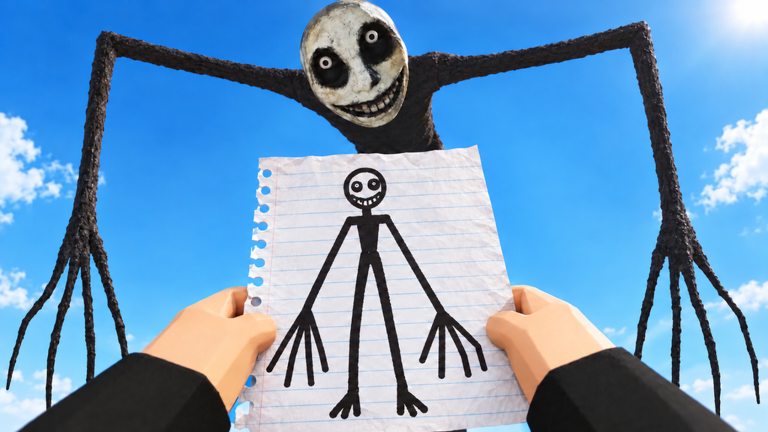
Want a Monster Maker creature that feels scary instead of noisy? This Scary Designs tier list ranks patterns, not single shop SKUs. Spikes alone rarely frighten anyone in a bright Roblox server. Silhouette, contrast, pacing, and honest part types do.
Watch the mid-article video for strange community examples, then rebuild ideas with correct arm/leg/tail roles. Cross-link Best Parts for what to unlock and Famous Monsters when you are recreating known icons with a horror twist.
What “scary” means in this sandbox
Scary reads as:
- Uncertain intent (is it smiling or baring teeth?)
- Predatory proportions (reach, crouch, long limbs)
- High-contrast focal points (eyes/mouth) on a darker body
- Motion that looks heavier or twitchier than mascot walks
Scary does not require every limited decal or a script. Skip the Scripts Hub temptations; bans are scarier than your monster.
S-tier patterns
1. Tall stalker biped
Long legs, slightly short torso, arms that hang below mid-thigh, small neat head. Walk cycle should feel deliberate. Keep colors desaturated with one bright eye pair.
2. Wide bruiser with quiet face
Bulk in the torso and clubs for arms, but a nearly blank face except for pinpoint eyes. Slam and stomp sell threat; the face stays cold.
3. Negative-space mouth
Dark interior mouth sticker larger than expected, minimal other face decals. Works on neutral S-tier heads from the parts list.
These three patterns survive gallery lighting and game modes without depending on a single limited mesh.
A-tier patterns
- Asymmetric horn with mirrored body — One dramatic head feature, body still symmetric so animation stays clean.
- Digitigrade hunter — Reverse joints + medium tail; whip tests look predatory if the tail is typed correctly.
- Masked blank — Full-face dark sticker with tiny eye cuts; great for uncanny mascots.
- Long-neck lean — Use sparingly; pair with stable legs or it reads broken instead of eerie.
A-tier needs more testing time in the workshop. Follow How to Make Monsters when mirrors fight you.
B-tier patterns
- Extra limb illusions using stickers (not fake part types)
- Heavy scar layering over an otherwise clean rig
- Bright “biohazard” accents on dark armor colors
- Tiny body / huge hands comedy-horror hybrids
B-tier shines in showcases highlighted on the Players Hub but can confuse read at distance.
C-tier traps
- Rainbow spike coats that destroy outline
- Every slot filled with teeth decals
- Floor-length tails that clip through walk cycles
- Arms secretly typed as tails “because whip looks cool”
- Copying a famous cute mascot then only recoloring it black
C-tier is allowed for experiments—just do not spend gems there first. Earn surplus after codes and a solid S/A base.
Color and value cheatsheet
- Pick a dark base (charcoal, deep green, bruised purple).
- Add one light accent for claws or scars.
- Make eyes the brightest element.
- Avoid full-specular rainbow unless you are parodying horror.
- Check the design against workshop HDR and in-mode lighting.
If eyes vanish outdoors, bump contrast before adding more geometry.
Animation choices that raise fear
- Prefer slower walk cycles for stalkers; frantic walks read goofy.
- Use slam/stomp on bruisers; soft hits undercut bulk.
- Tail whip only if the tail is real and typed—fake whips from arm parts look buggy, not scary.
- Idle stand should not fidget like a dance emote unless you want uncanny comedy.
Rehearse with the battery taught in Getting Started and inputs from Controls.
Build recipe (45 minutes)
- Start from S-tier head/torso/legs in Best Parts.
- Choose one S-tier pattern above—do not mix all three.
- Limit stickers to mouth + eyes + one scar.
- Mirror once, fix clipping, save version
horror_v1. - Run animations; adjust limb length before colors.
- Drop into a mode or community browse to see distance reads.
- Iterate
horror_v2with a single change.
Inspiration without theft
Strange community monsters (see the embed) are study material. Rebuild the feeling—long reach, blank face, heavy step—not the exact sticker stack. Credit inspiration if you post elsewhere. For recognizable IP-style recreations, use Famous Monsters and keep horror tweaks original.
After patches like those tracked in November 2026, retest lighting and mode rules; sometimes “too dark” palettes need a slight lift.
Scary is a design skill. Master patterns, type parts honestly, and your monsters will haunt the gallery for the right reasons.
Frequently Asked Questions
Quick answers for builders, codes, and game modes.
Do I need limited spikes to make a scary monster?
No. Silhouette, contrast, and animation intent matter more. Start with flexible S-tier parts and one clear horror pattern.
Why does my horror build look silly in walk tests?
Usually wrong part types, frantic walk timing, or rainbow clutter. Retype limbs, slow the read, and simplify colors.
What is negative-space mouth design?
A large dark mouth interior with few other face stickers so the void becomes the focal point.
Can I mix stalker and bruiser patterns?
Beginners should pick one S-tier pattern first. Mixing tall limbs with ultra-bulk often muddies the silhouette.
Where should I study weird examples?
Use the video on this page plus community browsing tips on the Players Hub—then rebuild the feeling yourself.